

If you work at a desk for several hours a day, you probably know how quickly a basic workspace can start feeling uncomfortable. At first, you might not think much about it. You sit down, open your laptop, get through your work, and move on with your day. But after spending weeks or months in the same position, you begin to notice the little things.
Maybe your desk feels too low. Maybe your monitor isn’t sitting at the right height. Maybe you constantly have to rearrange your keyboard, laptop, and other equipment just to make enough room. Or perhaps you’re simply tired of sitting in one position for most of the day.
That was what made me interested in VersaDesk.
Rather than treating a desk as just another piece of office furniture, VersaDesk focuses on creating more flexible workspaces, including electric standing desks, standing desk converters, drafting tables, workstations, seating, and accessories. The current lineup includes options for everything from compact home offices to larger professional and multi-monitor setups.
After looking through the range, I can see why VersaDesk is worth considering for anyone who feels their current workspace could use an upgrade.
First Impressions: VersaDesk Feels Built Around Flexibility
The first thing I noticed about VersaDesk is that there isn’t just one solution for everyone.
That’s important because no two workspaces are exactly alike.
A person working from a small bedroom office may want a completely different setup from someone with a large professional office. A gamer might need space for multiple monitors and accessories, while a designer or artist could benefit more from a drafting table. Someone who already loves their existing desk might not want to replace it at all.
VersaDesk seems to understand this.
Its product range includes full-size standing desks, L-shaped and corner desks, standing desk converters, drafting tables, workstations, and accessories.
That variety makes the brand feel less like it is trying to sell you one particular desk and more like it is giving you different ways to build a workspace around your own routine.
And honestly, that’s one of the things I appreciate most.
The PowerLift Standing Desk: A Strong Choice for a Full Upgrade
If you’re ready to replace your current desk completely, the PowerLift Electric Standing Desk is one of the options that immediately stands out.
The idea is simple: instead of being stuck at one fixed height, you can adjust the desk so that it works for both sitting and standing.
That flexibility can make a noticeable difference during a long workday.
There are times when sitting is exactly what you want. Other times, standing for a while can be a nice change of pace. With an electric adjustable desk, switching between the two doesn’t have to become a whole project.
VersaDesk’s current PowerLift range includes standard, L-shaped, and corner configurations, giving users more freedom to choose a shape that fits their workspace. The company describes its electric standing desks as having adjustable height and designs intended for everyday productivity and professional use.
For someone building a serious home office, that’s a big advantage.
You can create a workspace that feels more personalized instead of simply adapting yourself to the limitations of a fixed-height desk.
I Like the Idea of Being Able to Switch Positions
One of my favorite things about an adjustable desk is also one of the simplest.
You have a choice.
Instead of sitting in exactly the same position for hours, you can change the height of the desk when you feel like standing. When you’re ready to sit again, you can lower it.
It sounds like a small feature, but when something is part of your daily routine, convenience matters.
The PowerLift range uses electric height adjustment, and VersaDesk also highlights programmable height presets on some of its products. That means you can make your preferred sitting and standing positions easier to return to instead of constantly guessing where the desk should be.
For people who spend most of their working day at a computer, that kind of flexibility can make the desk feel much more useful.
What If You Already Have a Desk You Like?
This is where VersaDesk becomes even more interesting.
Not everyone wants to buy a completely new desk.
Maybe your current desk looks great. Maybe it fits perfectly in your room. Maybe you’ve already spent money on it and simply want to make it more flexible.
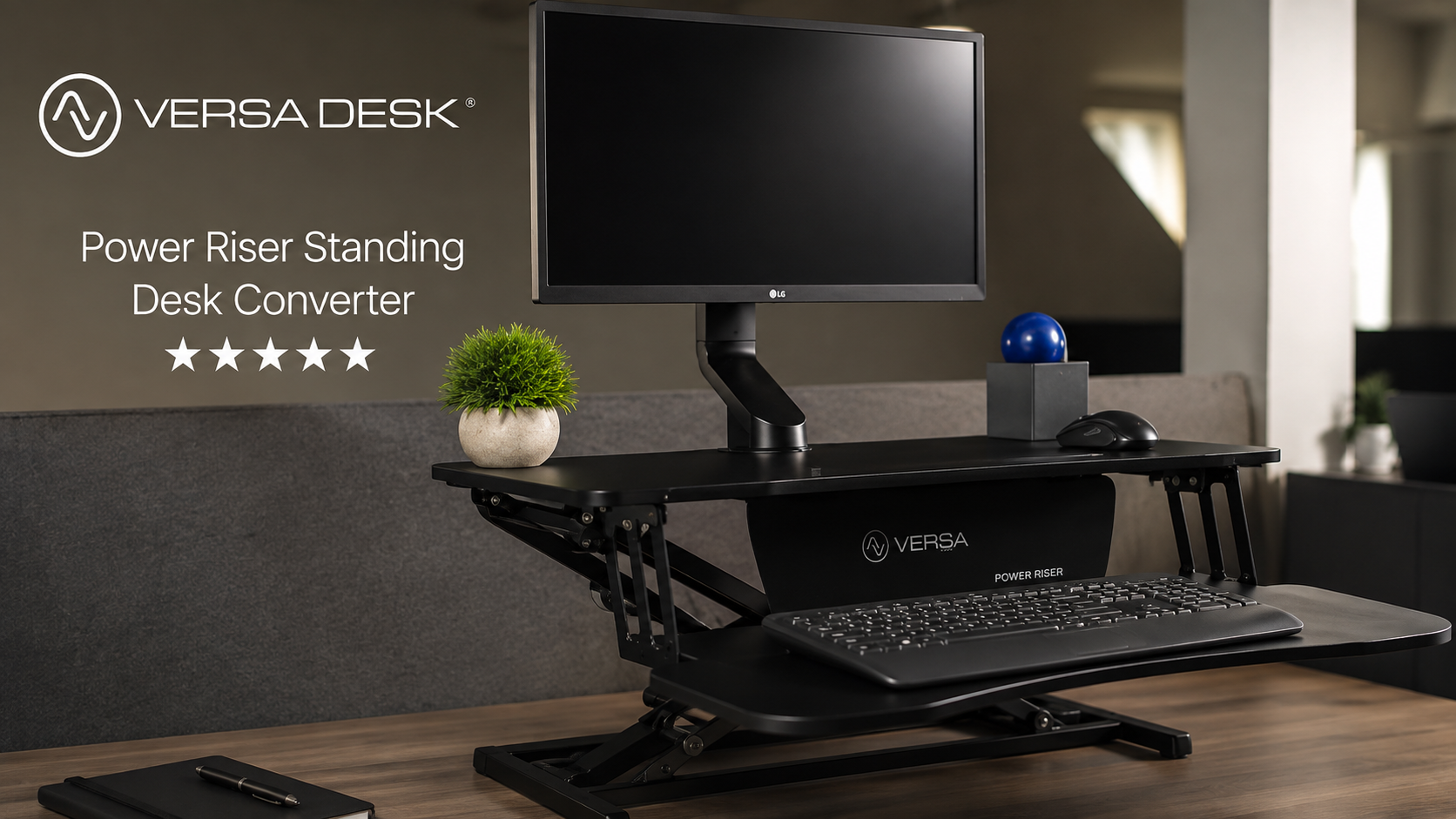
That’s where the PowerPro standing desk converters come in.
Instead of replacing your existing desk, a converter sits on top of it and gives you the ability to move your working surface between sitting and standing positions.
VersaDesk currently offers several PowerPro configurations, including the standard PowerPro, PowerPro Corner, PowerPro Elite, and PowerPro Elite Corner.
The standard PowerPro is designed for people looking for a straightforward electric upgrade, while the Elite versions add features such as programmable height settings, app control, USB charging, and LED functionality.
For someone who isn’t ready for a full desk replacement, this is a really practical approach.
PowerPro: A Smart Way to Upgrade Without Starting Over
I think this is probably one of VersaDesk’s most appealing ideas.
Upgrading a workspace doesn’t always mean throwing everything away and starting from scratch.
With a converter, you can keep your existing desk while adding the sit-stand functionality you’re missing.
The PowerPro is listed with multiple width options and support for dual-monitor setups, while VersaDesk says the standard model can support up to 80 pounds.
That makes it particularly interesting for people who already have a home-office setup and simply want more flexibility.
It also means you can potentially make a meaningful change to your workspace without having to completely redesign the room.
The PowerPro Elite Adds More Convenience
If you like technology and want a little more control, the PowerPro Elite takes things a step further.
The Elite model includes programmable height presets and mobile app control, along with USB and USB-C charging and an LED system.
Personally, I like features like this when they’re actually useful rather than added just for the sake of looking high-tech.
Being able to save your preferred heights can make everyday adjustments quicker. And built-in charging is one of those little conveniences that can help reduce cable clutter around your desk.
It isn’t something everyone needs, but for someone building a more modern workstation, it makes sense.
Plenty of Options for Multi-Monitor Setups
Another thing worth mentioning is workspace.
A desk can look spacious when it’s empty, but things change quickly once you start adding equipment.
One monitor becomes two. Then there’s a laptop, keyboard, mouse, speakers, headphones, notebook, phone charger, and whatever else you need during the day.
Suddenly, the desk doesn’t feel so spacious anymore.
VersaDesk offers configurations and accessories aimed at more equipment-heavy workspaces. Its accessories include monitor arms, keyboard trays, CPU holders, cable-management solutions, and other workspace additions.
That makes it easier to think about the workspace as a complete setup instead of simply buying a desk and figuring everything else out later.
The Accessories Can Make a Bigger Difference Than You Expect
When people shop for desks, accessories are usually the last thing they think about.
I actually think they’re worth paying attention to.
A monitor arm can help free up valuable desk space. A keyboard tray can change how your hands and arms sit while you’re working. A CPU holder can keep a desktop tower off the floor, while cable-management accessories can help keep everything looking cleaner.
These aren’t glamorous upgrades, but they can make a workspace feel much more organized.
VersaDesk offers accessories designed around these kinds of needs, including monitor arms, keyboard trays, CPU holders, and cable-management products.
Once you start putting a complete setup together, these small improvements can add up.
The Design Is Modern Without Being Over the Top
Another positive point is the overall appearance.
A desk is often one of the largest pieces of furniture in a home office, so appearance matters.
You don’t necessarily want something that looks like a piece of industrial equipment sitting in the middle of your room. At the same time, you don’t want to sacrifice functionality just to get something that looks good.
VersaDesk’s designs generally have a clean, professional appearance that can work in different environments.
Whether you’re putting together a minimalist home office, a gaming setup, a creative workspace, or a more traditional professional office, there are different configurations to choose from.
That’s helpful because the best desk isn’t necessarily the desk with the most features. It’s the one that fits your room and your routine.
What About Corner Workspaces?
If you’ve ever tried setting up an office in a corner, you know that regular rectangular desks don’t always make the best use of the available space.
That’s another area where VersaDesk offers some flexibility.
The company has both corner standing desks and corner converter options. The PowerPro Corner, for example, is designed specifically for corner setups, while the PowerLift line includes corner and L-shaped configurations.
For someone working with limited room, this can be a useful way to maximize the available surface without making the entire room feel crowded.
VersaDesk Isn’t Just for Home Offices
Although standing desks are especially popular with people working from home, VersaDesk’s range goes beyond the typical home-office setup.
The company also offers workstations, cubicles, educational furniture, drafting tables, conference tables, seating, and other office solutions.
That broader range gives the brand a more professional feel.
It’s not simply about having a trendy standing desk in your bedroom. The product lineup is designed around different types of work environments and different ways people use their desks.
Who Should Consider VersaDesk?
In my opinion, VersaDesk is particularly worth looking at if you fall into one of these categories:
- You work from home for several hours a day.
- You spend a lot of time working at a computer.
- You want the option to sit and stand during the day.
- You have a multi-monitor setup.
- Your current desk feels cramped.
- You want to organize your cables and equipment better.
- You already own a desk but want to add standing functionality.
- You’re building a new home office.
- You need an L-shaped or corner workspace.
- You want a desk that can adapt as your workspace changes.
The biggest benefit is flexibility.
Instead of buying a desk and accepting whatever height and layout it happens to have, you can choose a setup based on how you actually work.
What I Like Most About VersaDesk
If I had to narrow the appeal down to a few points, these would be at the top of my list.
Flexible setup options:
There are full-size standing desks, converters, corner designs, L-shaped options, and more.
Electric height adjustment:
Being able to change the height at the push of a button makes the sit-to-stand transition much easier.
Good choice for different setups:
Whether you’re using one monitor or building a more equipment-heavy workstation, there are different configurations to consider.
Upgrade-friendly:
The PowerPro range is particularly appealing if you want to keep your existing desk.
Useful accessories:
Monitor arms, keyboard trays, CPU holders, and cable-management options can help turn a basic desk into a more complete workstation.
Modern appearance:
The designs are professional enough for an office while still fitting naturally into a modern home workspace.
A Few Things to Think About Before Buying
Even though my overall impression of VersaDesk is positive, it’s still worth taking a few minutes to think about what you actually need before choosing a model.
First, measure your available space.
A larger desk can be fantastic if you have room for it, but you don’t want to buy something that overwhelms a small office.
Second, think about your equipment.
If you’re using multiple monitors, a desktop computer, speakers, and other accessories, make sure the specific model you choose is appropriate for your setup. VersaDesk provides different capacity and configuration options across its range.
Finally, decide whether you really need a full standing desk.
If your current desk is already good and you simply want sit-stand functionality, a converter could make more sense.
That decision alone can save you from replacing furniture unnecessarily.
Is VersaDesk Worth the Upgrade?
This is probably the biggest question.
And for me, the answer is yes, especially if your current workspace isn’t working as well as you’d like.
A standing desk isn’t going to magically make every workday better. But it can give you something a traditional fixed desk can’t: flexibility.
You can adjust the height to suit different tasks. You can alternate between sitting and standing. You can create more room for your equipment. And with the right accessories, you can build a setup that feels considerably more organized.
VersaDesk also gives you different ways to approach the upgrade.
You don’t necessarily have to replace everything.
You could choose a PowerLift desk if you’re building a new workspace from the ground up, or look at a PowerPro converter if you’d rather keep your existing desk.
That makes the brand appealing to a wider range of users.
Final Verdict
After looking through VersaDesk’s current lineup and considering what makes a workspace genuinely useful, I can understand why the brand stands out.
What I like most isn’t simply the fact that VersaDesk makes standing desks. It’s the overall approach to workspace flexibility.
There are options for people who want a complete desk replacement, options for people who want to upgrade an existing desk, corner and L-shaped configurations for different rooms, and accessories that can help bring everything together.
The PowerLift range is particularly appealing if you’re ready to build a dedicated sit-stand workstation, while the PowerPro range makes a lot of sense for anyone who wants to upgrade an existing desk without completely starting over.
At the end of the day, your desk is something you interact with almost every working day. If it’s uncomfortable, cramped, difficult to organize, or simply doesn’t suit the way you work anymore, upgrading it can be one of those changes that seems small at first but becomes surprisingly valuable over time.
Overall Rating: 4.5/5
For anyone looking for a flexible, modern, and practical workspace solution, VersaDesk is definitely a brand worth checking out.
Sometimes improving your workspace isn’t about adding more technology or buying the most expensive equipment. Sometimes it’s simply about creating a desk setup that works better for you.
And that’s where VersaDesk makes a strong impression.